See what AI sends your store, what keeps it from sending more, and decide what to fix first.

A Shopify app that checks what keeps your products out of AI shopping, shows which products ChatGPT, Perplexity, Gemini, Copilot and Meta AI send shoppers to, and writes pages from your own reviews and returns.

Coming soon on the Shopify App Store, with a free plan.

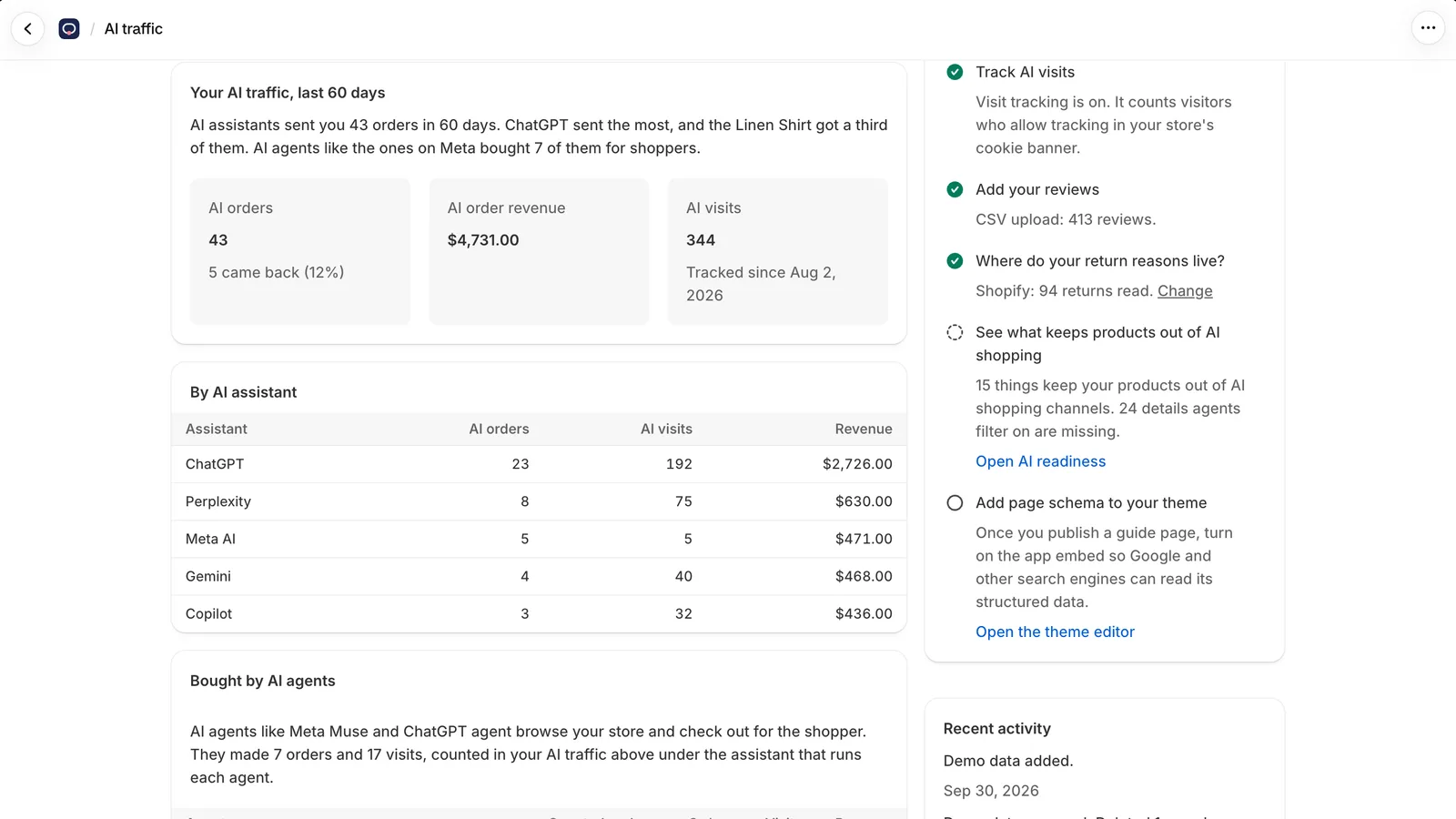
The app's AI traffic screen: AI assistants sent 43 orders in 60 days, with orders, revenue and visits by assistant (ChatGPT, Perplexity, Meta AI, Gemini, Copilot) and a setup checklist.
The AI traffic report, with sample data from the app's demo mode. Yours fills in from your last 60 days of orders.

Counts shoppers sent by

  • ChatGPT
  • Perplexity
  • Gemini
  • Copilot
  • Claude
  • Meta AI

And orders AI shopping agents place for shoppers, such as ChatGPT agent and Meta checkout, which includes Muse.

One loop, every week

The weekly loop: 1, watch AI traffic from assistants and agents. 2, learn the need. 3, create pages from store data. 4, measure against untouched products. Then it starts again. Every week 1 Watch AI traffic From AI assistants and agents 2 Learn the need “Wide-fit trail shoe” 3 Create pages from store data Reviews, returns, specs 4 Measure against untouched products Half get pages, half don't The weekly loop: 1, watch AI traffic from assistants and agents. 2, learn the need. 3, create pages from store data. 4, measure against untouched products. Then it starts again. Every week 1 Watch AI traffic From AI assistants and agents 2 Learn the need “Wide-fit trail shoe” 3 Create pages from store data Reviews, returns, specs 4 Measure against untouched products Half get pages, half don't
Real AI visits decide which pages get made next.

Features

AI readiness

Find what keeps your products out of AI shopping

Shopify Catalog feeds ChatGPT, Copilot, Google AI Mode and Meta. The check finds what keeps your store or products out of it, and links each fix in your Shopify admin.

  • Store checks: storefront password, plan and store policies
  • Product checks: images, prices, Online Store, category and sizes
  • Products sorted by the AI visits they get, so you fix the busiest first
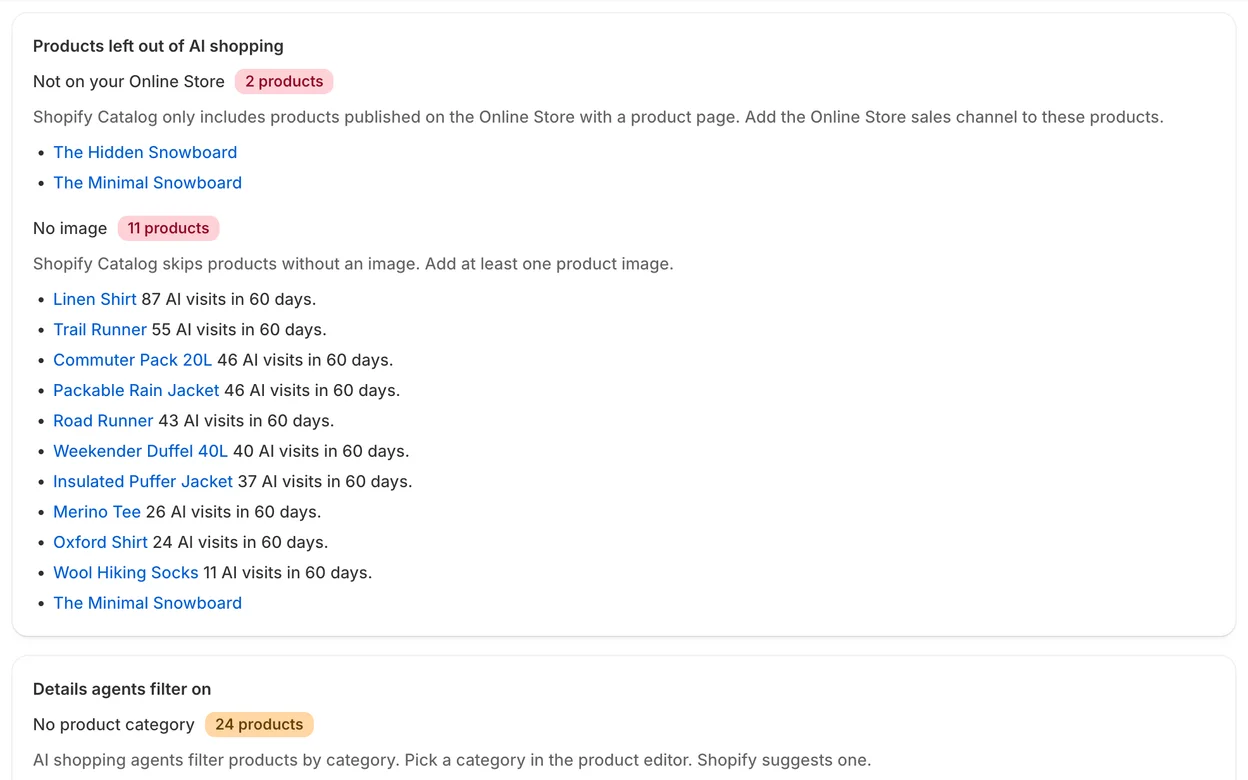
The AI readiness screen lists products left out of AI shopping: 2 not on the Online Store and 11 with no image, each with its AI visits in 60 days.

AI crawler check

Make sure AI search can read your store

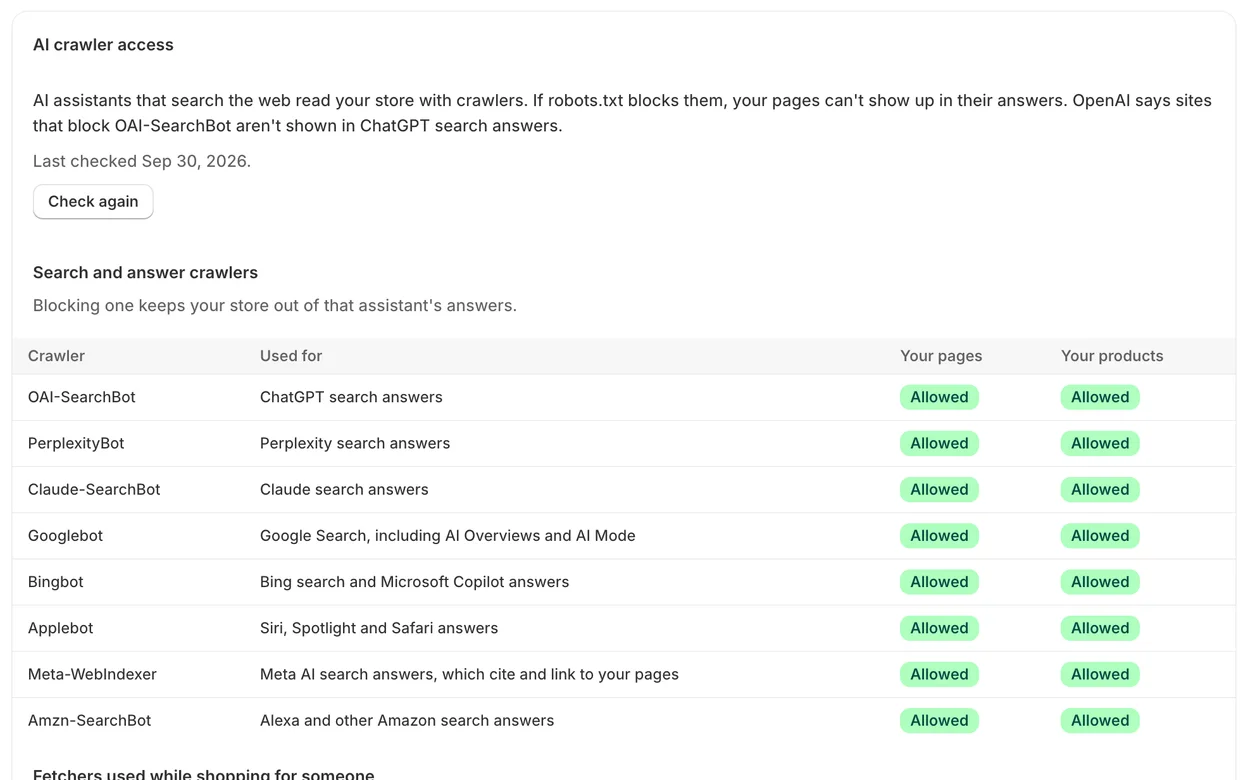
AI assistants that search the web read your store with crawlers. If your robots.txt blocks one, your pages can't show up in that assistant's answers. The app checks every week and tells you which ones are blocked.

  • OAI-SearchBot, PerplexityBot, Claude-SearchBot, Googlebot, Bingbot and more
  • Search crawlers kept apart from training crawlers, so you block only what you mean to
  • Checks your pages and your products separately
The AI crawler access table: OAI-SearchBot, PerplexityBot, Claude-SearchBot, Googlebot, Bingbot, Applebot, Meta-WebIndexer and Amzn-SearchBot are all allowed to read the store's pages and products.

Guide pages

Pages written from your own reviews and returns

Fit guides, comparisons and answer pages for the questions AI shoppers ask. Every sentence is checked against your store's data, and anything the data doesn't back is cut before you see the page.

  • Nothing goes live until you approve it
  • Structured data, so search engines and assistants can read each page
  • Regular Shopify pages that stay in your store if you uninstall
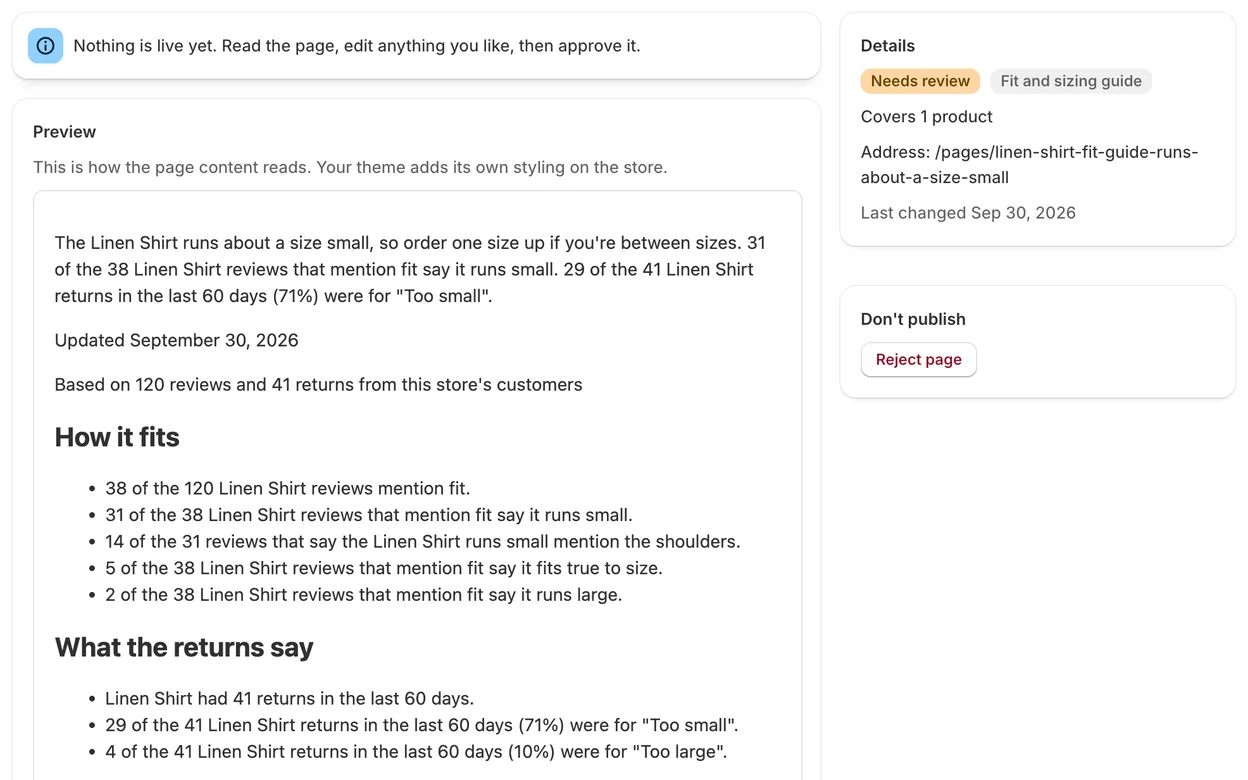
A draft Linen Shirt fit guide waiting for review, with an Approve and publish button. It says the shirt runs about a size small, based on 120 reviews and 41 returns.

Split test

Proof on your own products

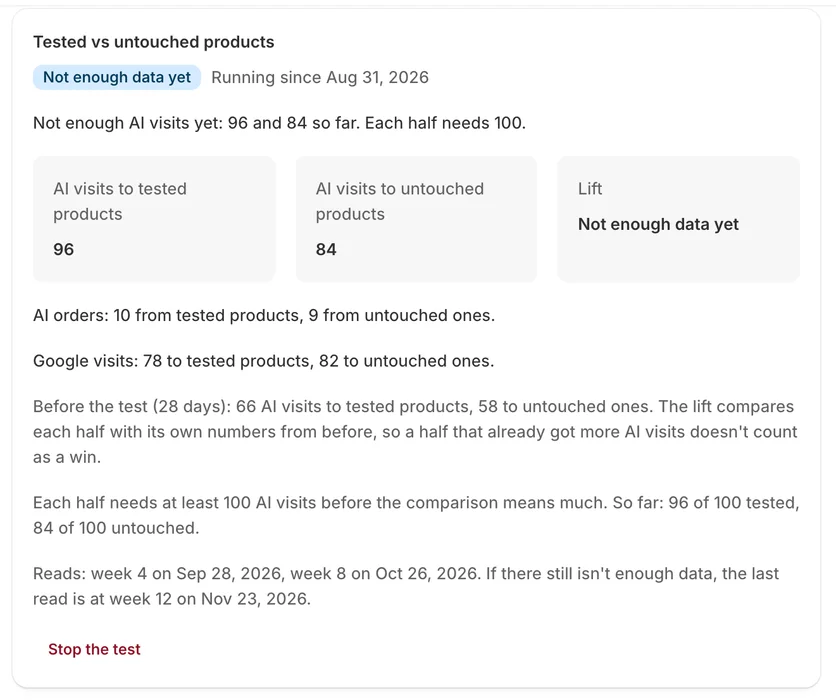
Products are paired by similar AI traffic, and a coin flip picks which one of each pair gets pages. You see whether AI visits change for the half with pages.

  • Each half is compared with its own numbers from before
  • Counts organic AI visits only, not visits from ads
  • Reads at week 4 and week 8, and a last one at week 12 if needed
The split test screen: 96 AI visits to tested products and 84 to untouched ones so far, with the lift shown as not enough data yet.

Also in the app

  • Orders placed by AI agents

    Orders AI shopping agents placed for shoppers, such as ChatGPT agent and Meta checkout (which includes Muse), shown apart.

  • What AI shoppers searched for

    The searches visitors from AI assistants ran on your store, grouped into the needs they point to.

  • Page ideas

    Ranked by the evidence in your reviews, returns and on-site searches, so the next page answers a real question.

  • Product copy updates

    A short block of facts for a product description, added only when you approve it, with one-click undo.

  • Pages in 5 languages

    On the Scale plan, pages are translated into up to 4 of your store's other languages.

  • A weekly email

    Your AI orders and visits for the week, new pages, the next page ideas and how the split test is going.

Built to be trusted with your store

  • Numbers come from your data

    Every number on a page comes from your orders, reviews and returns. Code does the counting, not the AI.

  • You approve first

    Pages and description changes wait for you. Auto-publish is there if you want it, after your first batch.

  • No shopper details

    It never stores shoppers' names, emails, phone numbers or addresses. Visit data is deleted after 90 days.

  • Your theme stays yours

    It never edits theme code. Structured data comes from an app embed you can switch off.

Pricing

Every plan includes the AI traffic report and the readiness check.

Free

$0

See your AI traffic and what holds it back.

  • AI traffic report
  • AI readiness check
  • 3 pages a month

Pro

$49 a month

More pages, product copy updates and a split test.

  • Everything in Free
  • 30 pages a month
  • Product copy updates
  • Monthly page refresh
  • Split test on your own products

Scale

$149 a month

For larger catalogs and stores that sell in several languages.

  • Everything in Pro
  • 150 pages a month
  • Pages in up to 5 languages: your store's language plus 4 translations
  • Priority support

US dollars, billed through Shopify every 30 days.

Questions

Which AI assistants and agents does it track?

Visits and orders from ChatGPT, Perplexity, Gemini, Copilot, Claude and Meta AI, the assistants that send shoppers to your store with a link. It also shows orders AI shopping agents placed, such as ChatGPT agent and checkouts in Shopify's Meta channel, which include Muse. Some agents browse like an ordinary browser, so not every agent visit can be told apart.

How does it know an order came from AI?

It reads each order's customer journey in Shopify: the landing page, referrer and UTM tags. A web pixel adds visits and on-site searches from visitors who arrived from an AI assistant, and only for visitors who gave consent in your cookie banner.

Does it change my theme or product pages?

It never edits theme code. Guide pages are regular Shopify pages, and their structured data comes from a theme app embed you can turn off. Product descriptions change only when you approve a suggestion, and you can undo it in one click.

Does it publish anything without asking?

No. Pages wait for your approval. After you approve your first batch you can turn on auto-publish, and a page with any statement the check isn't sure about still waits for you.

What do I need for it to work?

The traffic report and the readiness check work on any store with the Online Store sales channel. Pages need something to learn from: reviews (from Judge.me or a CSV file) and returns.

What data does it keep?

Your products, orders without any customer details, returns, reviews without reviewer names, and AI visits. Visit-level data is deleted after 90 days. The privacy policy has the details.

What happens if I uninstall?

Shopify removes the web pixel and the theme app embed, and any paid plan ends. Pages you published stay in your store. Shopify asks us to delete your store's data 48 hours later, and we do.

Coming soon on the Shopify App Store

Email us and we'll tell you the day it launches. We reply within 2 business days.

hello@mydecisions.ai